• Skip to main content
  • assistive.skiplink.to.breadcrumbs
  • assistive.skiplink.to.header.menu
  • assistive.skiplink.to.action.menu
  • assistive.skiplink.to.quick.search
  • Metropolia.fi
  • Curricula
  • Wiki
  • Moodle
Metropolia
Menu
    • Attachments (6)
    • Page History
    • Page Information
    • Resolved comments
    • View in Hierarchy
    • View Source
    • Export to PDF
    • Export to Word
  • Browse
    • Pages
    • Blog
    • Labels
    • Space Operations
  • Metropolia Login
  • Haka Login
  • Visitor Login

IT Services

  1. Dashboard
  2. IT Services
  3. …
  4. Front page
  5. Software and Systems
  6. Email, Communications, and Videoconferencing
  7. Metropolia E-mail and Calendar (Exchange)
  8. Outlook on the web
Print
Main navigation

Change the theme in Outlook on the web

You can change the theme in Outlook on the web follows:


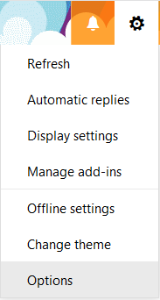
1. In the upper right corner, click on the cog wheel icon and select Change theme:

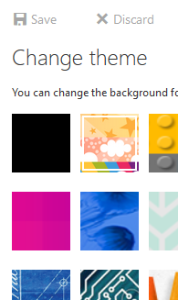
2. Select a theme and click OK:


Outlookin selainliittymän teeman muuttaminen


  • Created by Kalevi Lehto, last updated on 1.8.2019 1 minute read
  • updated2022
Overview
Content Tools
Apps
Pages
Blog
Labels
Space Operations
  • Powered by Atlassian Confluence 9.2.21
  • Printed by Atlassian Confluence 9.2.21
  • Report a bug
  • Atlassian News
Atlassian